
Most algebra students meet systems of equations as a puzzle with two unknowns and two clues: tickets and money, coins and value, two phone plans and the month they cost the same. Solving one by hand isn’t hard, but it’s fiddly. One dropped minus sign in an elimination step and the whole answer moves. This system of equations calculator does the arithmetic exactly and shows every step, so you can check your own working line by line, or see how a method you haven’t tried yet would handle the same problem.
How to use the system of equations calculator
- Choose 2 or 3 equations. Two equations use
and ; three use , and . - Type each equation the way you’d write it:
2x + 3y = 12,y = 2x − 1or2(x + y) = 14. They don’t need to be in standard form. - Pick a method from the tabs: substitution, elimination, Cramer’s rule or Gauss-Jordan.
- Read the result, then the numbered steps, then the check. With two equations, the graph shows both lines and the point where they cross.
What you can type
| You type | The calculator reads | Notes |
|---|---|---|
2x + 3y = 12 | standard form | |
y = 2x − 1 | rearranged for you | |
1/2x + y = 3 | fractions stay exact | |
0.5x − y/4 = 2 | decimals and division by a number | |
2(x + y) = 14 | brackets are expanded | |
x + 2 = 3y | variables on both sides |
Anything that isn’t linear, such as
Worked example: solving a system with steps
The calculator opens on this system:
Here’s what the elimination tab shows, step by step.
Step 1 — make the
Step 2 — subtract it from the first equation. The
Step 3 — back-substitute into the first equation:
Step 4 — check both equations:
The solution is
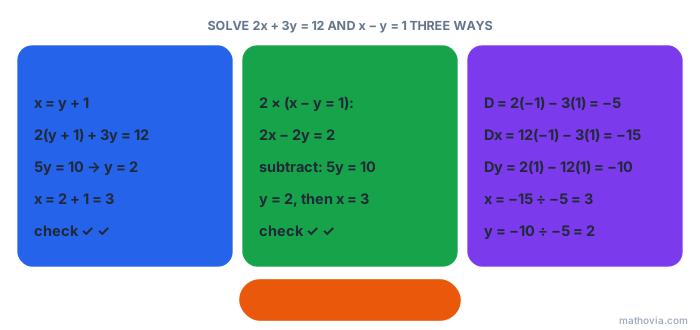
Four methods, one answer
| Method | How it works | Use it when |
|---|---|---|
| Substitution | solve one equation for a variable, plug it into the other | a variable is already alone, or has coefficient |
| Elimination | scale the equations so a variable cancels when you add or subtract | both equations are in standard form |
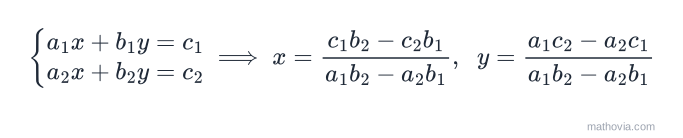
| Cramer’s rule | divide determinants: | you want a formula, or need just one variable |
| Gauss-Jordan | row-reduce the augmented matrix | three or more variables, or you’re learning matrices |
Cramer’s rule is the formula in the picture at the top of this page. For two equations, the determinant is
Solving a system of 3 equations with 3 variables
Switch to three equations and the calculator opens on
The elimination tab removes
When there’s no solution or infinitely many
Not every system has exactly one answer, and the calculator tells you which case you’ve got:
| Result | What the steps end with | On the graph |
|---|---|---|
| one solution | a value for every variable | the lines cross once |
| no solution | a false statement, like | parallel lines |
| infinitely many solutions | a true statement, like | the same line twice |
Try the examples y = 2x + 3 and 4x − 2y = 5. The x + 2y = 4 and 2x + 4y = 8 the second equation is just the first one doubled. The calculator reports infinitely many solutions and gives the general solution
Common mistakes the calculator helps you catch
- Sign slips when subtracting equations. Subtracting
means adding . Compare your line with the calculator’s at the step where they first differ. - Multiplying only part of an equation. Scaling
by changes the too. - Stopping after one variable. The answer to a two-variable system is an ordered pair. The check step only passes when both values are right.
- Misreading “no solution”. If your own working ends in
, you haven’t made a mistake. That’s the correct conclusion.
If you’d rather learn the methods than check them, start with systems of linear equations, which explains what a solution is and why there can only be one, none, or infinitely many. Then work through the systems of equations word problems, where setting up the equations is the real challenge, and use this calculator to check each answer.