
Rational equations have a reputation for being fiddly, and it’s mostly deserved. The algebra itself is ordinary; the trouble is that there are four or five places to slip, and one of them, the extraneous solution, produces an answer that looks perfectly fine until you plug it back in. This rational equations calculator solves the equation the way you’d be expected to show it in class, with each step written out, and it tells you plainly when an answer has to be thrown away.

How to use the rational equations calculator
- Type the equation with one equals sign. Put every denominator in brackets:
3/(x + 2), not3/x + 2, which means. - Use
^for powers, as in4/(x^2 - 1). Numbers, fractions and decimals all work. - Read the answer at the top. Excluded values and the LCD are listed underneath, along with any answer that was rejected as extraneous.
- Look at the graph. The blue and orange curves are the two sides of the equation. Solutions are where they cross, and dashed lines mark the x-values that are off limits.
The method, step by step
- List the restrictions. Any
that makes a denominator zero can never be a solution. - Find the LCD of all the denominators, factored.
- Multiply every term on both sides by the LCD. Each fraction cancels down to a polynomial.
- Solve the equation that’s left. It’s usually linear or quadratic.
- Check every answer against the restrictions from step 1.
Step 5 is the one people skip, and it’s the one teachers look for.
Worked example: 2/(x − 1) = 3/(x + 2)
This is the calculator’s first example.
Step 1 — restrictions. The denominators are zero at
Step 2 — clear the fractions. With a single fraction on each side, multiplying by the LCD
Step 3 — solve.
Step 4 — check. 7 isn’t excluded, and both sides come out equal:
Worked example with more than two fractions
Solve
Step 1 — factor the denominators.
Step 2 — multiply every term by the LCD. Each term keeps only the factors its own denominator was missing:
Step 3 — solve.
Step 4 — check.
Extraneous solutions, and why they appear
When you multiply both sides by the LCD, you’re multiplying by an expression that equals zero at the excluded values. Multiplying by zero makes any equation true, so the new equation can pick up solutions the original never had. They aren’t mistakes in your algebra; they’re a side effect of the method, and the check is how you remove them.
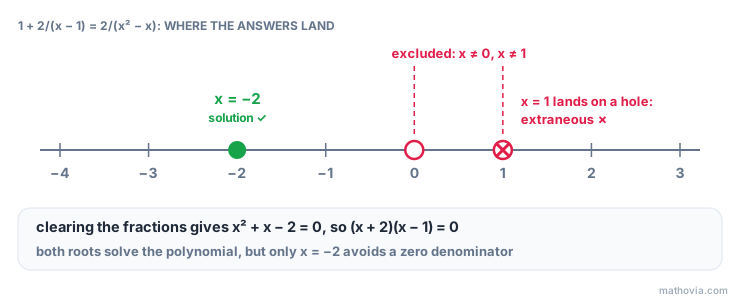
Take
The candidates are
Special cases the calculator reports
| What happens | Example | Result |
|---|---|---|
| Every candidate is excluded | no solution | |
| The variable cancels, leaving a false statement | no solution | |
| The variable cancels, leaving a true statement | both sides identical | every x except the restrictions |
| The leftover equation is quadratic |
Solving versus simplifying
People often search for a “simplifying rational equations calculator” when they mean one of two different jobs, and it helps to know which one you have.
- An expression has no equals sign, like
. You simplify it by factoring and cancelling: , with . The answer is another expression. - An equation has an equals sign, like
. You solve it, and the answer is a value of . Here, clearing the fraction gives , so and or . The is excluded, so .
This calculator does the second job. For the first, see simplifying rational expressions. The two meet in the middle: simplifying each side first often makes the LCD smaller and the solving shorter.
Where rational equations come from
They turn up whenever a rate is involved. Work problems are the classic case: if one pipe fills a tank in 4 hours and another in 12, together they fill 1/4 + 1/12 = 1/x and the calculator gives 3 hours. Speed and distance problems, where time is distance divided by speed, and inverse variation problems lead to the same kind of equation.
Common mistakes
- Multiplying only the fractions by the LCD. Every term gets multiplied, including whole numbers like the 1 in
. - Cross-multiplying with more than one fraction on a side. It only works for one fraction equal to one fraction.
- Skipping the factoring.
and share a factor. Missing it gives a bigger LCD and a messier equation. - Not checking the answers. Extraneous solutions look exactly like real ones.
- Typing
3/x + 2for. Brackets around the denominator are what tell the calculator, and your own algebra, where the fraction ends.
The rational equations lesson covers the method in more depth, and the rational equations practice problems make a good solving rational equations worksheet, with answers checked as you go.