
Gaussian elimination is elimination with the letters taken out. Instead of writing
How to use the Gaussian elimination calculator
- Choose 2 or 3 equations and type them in, using
, and . The equations don’t need to be in standard form. - Pick Gaussian elimination (row-echelon form plus back-substitution) or Gauss-Jordan (reduced row-echelon form).
- Follow the matrices. Each step names the row operation, such as
, and shows the matrix that results. - Read the answer at the top, with a check in every original equation.
From a system to an augmented matrix
The calculator opens on this system:
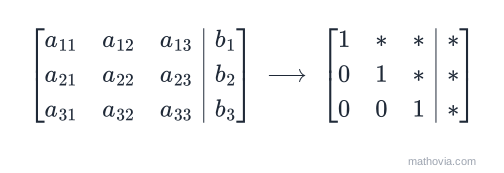
Its augmented matrix has one row per equation and one column per variable, with the constants after the bar:
If an equation is missing a variable, that entry is
Gaussian elimination step by step
The goal of the forward phase is to make zeros below each pivot, working one column at a time from left to right.
Column 1. Use row 1 to clear the entries below its leading
Column 2. Make the pivot
That’s row-echelon form: a staircase with zeros below every leading
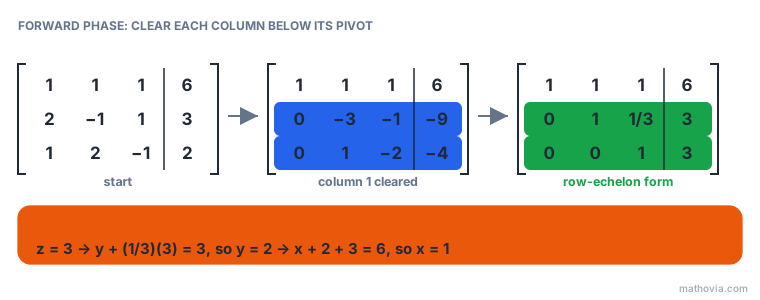
The solution is
Why row operations don’t change the answer
Each row of the matrix is an equation, so each row operation is something you could do to the equations themselves. Swapping two rows just lists the equations in a different order. Multiplying a row by (3) multiplies both sides of an equation by (3), which keeps it balanced. Adding a multiple of one row to another is exactly what the elimination method does when it adds two equations. None of these moves can create a new solution or lose an old one, so the system you end with has the same solution as the one you started with. That’s also why the calculator never multiplies a row by (0): that would erase an equation and throw information away.
Gaussian vs Gauss-Jordan elimination
| Gaussian elimination | Gauss-Jordan elimination | |
|---|---|---|
| Zeros created | below each pivot | below and above each pivot |
| Ends in | row-echelon form | reduced row-echelon form |
| Last step | back-substitution | read the answer off the matrix |
| Row operations | fewer | more |
| Best for | solving by hand | reading answers, finding inverses |
When there’s no solution or infinitely many
The final matrix also tells you when a system doesn’t have exactly one solution:
| Final row looks like | Meaning |
|---|---|
| a redundant equation, so there are infinitely many solutions |
Try the example x + y + z = 5, x + y + z = 8, x − y = 1. After
Mistakes that row-reduction catches
- Changing only part of a row.
changes every entry of , including the constant after the bar. - Using the wrong row as the pivot row. Always subtract multiples of the pivot row, not the row you’re changing.
- Dividing a row by zero. If the pivot position is
, swap in a row below that has a non-zero entry. The calculator does this and shows the swap. - Rounding too early. A
rounded to pushes every later step slightly off. Keep fractions.
For the theory behind every step, read the augmented matrices lesson and work through the augmented matrix practice problems. To solve the same system by substitution, elimination or Cramer’s rule instead, use the system of equations calculator.