
Inches to millimetres is the conversion that lets an imperial drawing be machined on metric equipment, or an imperial part be checked with a set of metric calipers. Machinists, 3D-printer operators, cabinet makers and mechanical engineers mostly work in millimetres, because a millimetre is small enough that dimensions stay clean whole numbers and a tolerance like ±0.05 mm reads naturally without a pile of decimal places. The number you multiply by, 25.4, isn’t a measurement anyone took with a ruler — it’s a definition, fixed by international agreement in 1959, so an inch-to-mm conversion has no rounding error built into it at all.
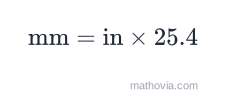
The inches to millimeters formula
Only two things go into it. in is your length in inches, written as a decimal — so a fractional measurement like 5/16” becomes 0.3125 first. 25.4 is the exact number of millimetres in one inch. There is no third term and no correction factor; the whole conversion is a single multiplication. To go the other way, divide by 25.4. For centimetres instead of millimetres, multiply by 2.54, or just divide your millimetre answer by 10.
Worked examples
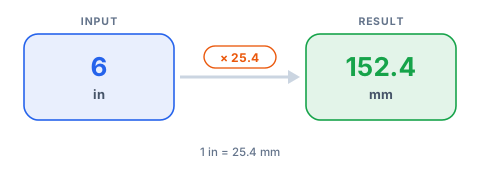
The calculator’s default, 6 inches:
Exactly 152.4 mm. Checking it through centimetres gives the same figure:
A fractional inch, 5/16”:
A real dimension — the actual thickness of a “2×4”:
A construction 2×4 is planed down to 1.5” by 3.5”, not a literal 2” by 4”.
So the stud you buy is 38 mm × 89 mm, which is exactly how the same timber is labelled in metric countries.
How to convert inches to mm in your head
Multiply by 25 and then add a little. The true factor is 25.4, so multiplying by 25 lands you about 1.6% low — close enough to picture a size, never close enough for a cut. Ten inches: 25 × 10 = 250, and the real answer is 254 mm. One inch is “a hair over 25 mm”, or a shade past 2.5 cm. For anything that gets built or machined, use the full 25.4 and keep the decimals.
Inches to mm conversion table
Fractional inches, in 1/16” steps:
| Inches | Decimal | Millimeters |
|---|---|---|
| 1/16” | 0.0625 | 1.5875 mm |
| 1/8” | 0.125 | 3.175 mm |
| 3/16” | 0.1875 | 4.7625 mm |
| 1/4” | 0.25 | 6.35 mm |
| 5/16” | 0.3125 | 7.9375 mm |
| 3/8” | 0.375 | 9.525 mm |
| 7/16” | 0.4375 | 11.1125 mm |
| 1/2” | 0.5 | 12.7 mm |
| 5/8” | 0.625 | 15.875 mm |
| 3/4” | 0.75 | 19.05 mm |
| 7/8” | 0.875 | 22.225 mm |
| 1” | 1.0 | 25.4 mm |
Whole and common inch sizes:
| Inches | Millimeters | Centimeters |
|---|---|---|
| 2” | 50.8 mm | 5.08 cm |
| 3” | 76.2 mm | 7.62 cm |
| 4” | 101.6 mm | 10.16 cm |
| 6” | 152.4 mm | 15.24 cm |
| 8” | 203.2 mm | 20.32 cm |
| 10” | 254 mm | 25.4 cm |
| 12” | 304.8 mm | 30.48 cm |
| 18” | 457.2 mm | 45.72 cm |
| 24” | 609.6 mm | 60.96 cm |
| 36” | 914.4 mm | 91.44 cm |
| 48” | 1219.2 mm | 121.92 cm |
| 60” | 1524 mm | 152.4 cm |
Where this conversion actually comes up
3D printing. A model drawn in inches has to be scaled to millimetres before a slicer will treat it sensibly — nozzle diameters, layer heights and wall thicknesses are all quoted in mm (0.4 mm nozzle, 0.2 mm layers). Import a 2” cube without converting and the slicer reads it as 2 mm.
Woodworking and CNC routing. Plans from US sources come dimensioned in inches and fractions; most machine controllers post-process in millimetres. Getting the 25.4 factor and the decimals right is the difference between a joint that closes and one that has a 0.4 mm gap.
Drill and tap sizes. A 1/4” hole is 6.35 mm, which falls between a 6 mm and a 6.5 mm metric bit, so an imperial drawing almost never maps onto a metric drill index cleanly. The conversion tells you which metric size is nearest and how far off it is.
Fasteners and wrench sizes. A 3/8” bolt head measures 9.525 mm across the flats — a 10 mm spanner is close but sloppy, and it rounds the corners over time. Knowing the exact millimetre size tells you when “close” is a problem.
Screen and TV mounting. Screen size is an inch diagonal; VESA mount spacing is in millimetres. A 55” TV has a 1397 mm diagonal, but the bolt pattern behind it is a separate metric figure you still have to look up — the diagonal conversion just confirms you’ve got the right panel.
Common mistakes when converting inches to mm
- Rounding 25.4 down to 25. It feels harmless and it costs you 1.6%. On a 300 mm part that’s nearly 5 mm.
- Mixing up mm and cm. Millimetres use ×25.4, centimetres use ×2.54. Slipping a decimal here turns 152.4 mm into 15.24 mm or 1524 mm.
- Treating nominal sizes as literal. “1/2 inch” pipe, “2×4” lumber and “3/4 inch” plywood are names, not measured dimensions. Convert the real measured size, not the label.
- Dropping decimals on a CNC drawing. “About 6.4 mm” instead of 6.35 mm is 0.05 mm of error — enough to spoil a press fit or a bearing journal. Carry at least three decimals.
- Converting area or volume with the linear factor. Square inches to square millimetres is ×645.16 (that’s 25.4²), and cubic inches is ×16387.064. The ×25.4 factor is for lengths only.
Converting inches to mm in a spreadsheet
In Excel or Google Sheets, if the inch value is in cell A1, the millimetre formula is =A1*25.4, and the reverse is =A1/25.4. Google Sheets also has a built-in unit function: =CONVERT(A1, "in", "mm"). For a whole column of fractional inches typed as text like 5/16, wrap it: =(LEFT(A1,FIND("/",A1)-1)/MID(A1,FIND("/",A1)+1,10))*25.4.
Related converters
For fractional inch measurements like 5/16” or 7/32”, convert the fraction to a decimal first with the inches fraction to decimal calculator, then run that number through this one. When the measurement is large enough that metres make more sense, use the inches to meters converter. Going from metric back to imperial, the mm to inches calculator reverses the whole thing, and cm to inches handles centimetre drawings.